





Moments · arriving with updates

Moments: show Evaari what you did

Moments is arriving with Evaari’s updates. Finish a step, take a photo and show it to Evaari: he looks, says a warm word and adds his sticker. The photo stays in your photo album by date — private until you choose to show it to friends for 24 hours. Friends answer with stickers, never with comments, and there’s no public feed.

  • Private by default
  • Friends only
  • No public feed
  • Delete any photo, any time
Download on the App Store Get it on Google Play
On a computer?Scan with your phone

Updated:

Show Evaari: he sips from his mug next to your photo of a glass of water and says Water first, everything else after. The photo is kept in the photo album and shown to friends for 24 hours
Show Evaari

He looks — and answers in his own words

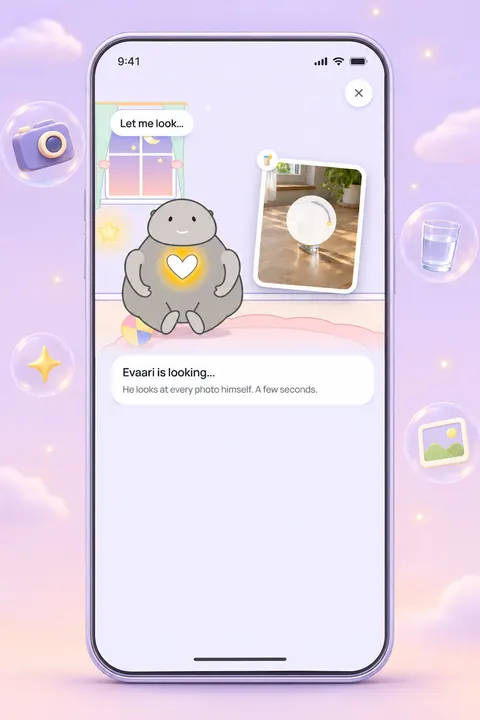
After a step or a quest, a second button appears beside the praise: Show Evaari. Take a photo or pick one, add a couple of words if you like. The photo flies to him, he looks at it and answers about this very photo — one small detail, a light joke about the things in it, never about you. Then he takes the step with you: has a sip, turns a page, waters his sprout.

  • Always on your side: no judging, no “you should have”
  • Never a word about your body, your food or your home
  • The step stays done whatever the photo shows — a photo proves nothing and takes nothing away
  • Water first, everything else after. I’ll have a sip too!
  • Those shoes have seen things today. Proud of them — and of you.
  • The bed is made. The day now officially has a beginning.
Evaari looks at your photo of a glass of water: Let me look… He looks at every photo himself. A few seconds
Photo album

Your days, kept by date

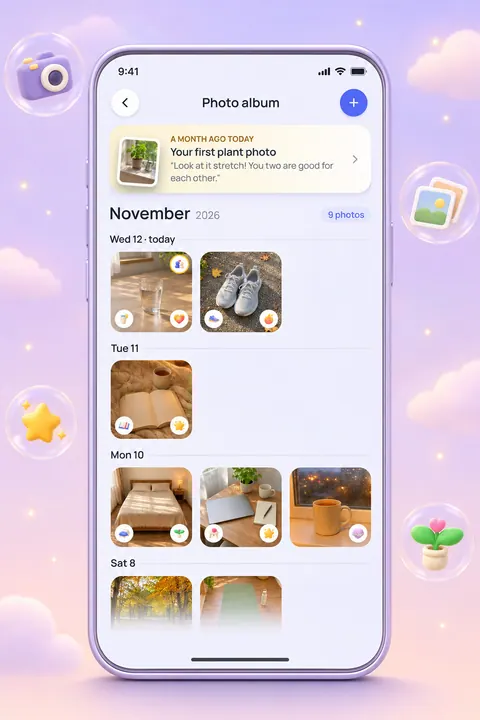
Every photo you show him lands in your photo album: day by day, the newest on top, each with his words and his sticker. “A month ago today” brings back an old photo with what he said then. The album is yours alone — friends never see it.

  • Change the caption, replace the photo or delete it: the buttons are right under the photo
  • Deleted means gone — at once for everyone, and erased from storage within the hour
  • Nothing is deleted for being old
The photo album for November: a glass of water and sneakers today, an open book, a made bed, a desk and a mug at a rainy window on earlier days
Stories

For friends, for 24 hours

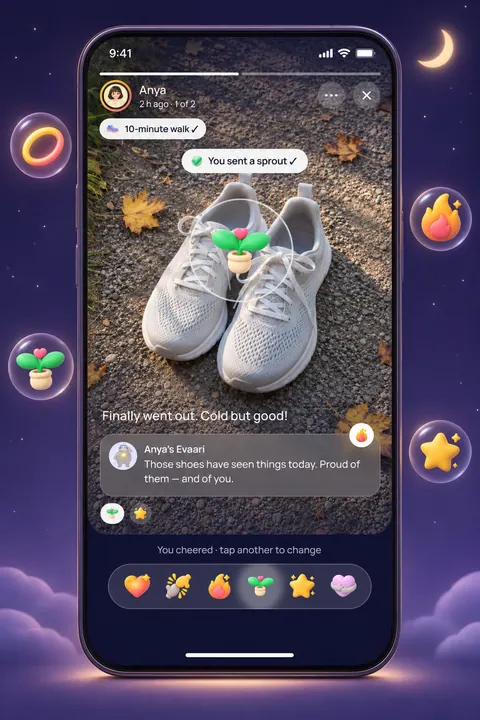
Want to share one? Switch on Show to friends · 24 h. A soft golden ring appears around your picture on your friends’ screens, and they open your photo like a story. The first reaction on it is always your own Evaari’s. After 24 hours the story is gone, and the photo stays only in your album.

  • Only friends — all of them, or just the ones you pick
  • They see which stickers came, never how many
  • You see who cheered you on, and never who looked
The Friends tab: a golden ring around Anya and Max, who have a story today, and Your story with a plus
Anya’s story: sneakers after a 10-minute walk, the caption Finally went out. Cold but good!, her Evaari’s words and six stickers
Stickers

Stickers instead of comments

Six stickers for friends and for Evaari, and two more that only he gives. One sticker per photo; tap another to change it. The only words in a story are your caption and Evaari’s — so there is never a comment to dread or a message you must answer.

  • Like
  • High five
  • Fire
  • Sprout
  • Star
  • Hug
  • Wow!
  • Strong!

Like, High five, Fire, Sprout, Star and Hug come from friends and from Evaari. Wow! and Strong! are only his.

Privacy

Private by design

Moments was drawn the other way round from a social network: your album first, friends only if you say so.

  • Private by default: a photo reaches friends only when you switch it on, and only for 24 hours
  • No public feed, no strangers, no link that opens a story
  • Every photo is checked before anyone else can see it
  • Your phone sends a smaller copy without the location tag; we keep two light copies, never the original
  • No face recognition. Evaari’s AI looks at a photo only with your OK
  • Friends see the name of your step only for quests and for the habits you chose to show
  • Hide anyone’s stories, turn stickers off, report a photo — or Evaari’s own words
  • Showing photos and stories are off for people under 13
Free and Plus

What is free, and what Plus adds

What is free, and what Plus addsFreeEvaari Plus
Showing Evaari a photoOne photo a day, plus one for a quest for twoUp to 5 photos a day, plus one for a quest for two
Photo albumThe last 30 days are open; older photos are kept and can be downloaded for freeThe whole album, and the collage of the month
Stories and stickersYesYes

Photos never give light, and you never have to show one to keep a step or a streak.

What’s in Evaari Plus

What is Moments in Evaari?

Moments is three things that belong together: Show Evaari, the photo album and stories. You show Evaari a photo of a step you did, he answers and keeps it in your album, and — only if you want — your friends see it for a day.

Moments arrives with Evaari’s updates. This page describes how it works once it reaches your app.

What does Evaari say about a photo?

One or two short, warm sentences about what is in the picture, in the language of your app, with a sticker of his own. He is always on your side. If the step is half done, or the photo shows something else entirely, he is simply glad about what he sees and keeps it — the step stays done.

He never comments on a body, a face, weight, age or clothes, never calls food good or bad, never calls a room untidy and never compares you with anyone, including yesterday’s you. He does not read out text, brands or addresses from a photo. If a person is in the picture, he says a ready-made kind line instead. He is an AI companion, and nothing he says about food, the body or exercise is medical advice.

Is my photo private?

Yes, by default. A photo you show Evaari is visible only to you. It becomes a story only when you switch on Show to friends for that photo, and you can switch it off again at any moment — it disappears from your friends’ screens at once.

Every photo is checked before anyone else can see it. A photo that can’t be kept is not stored at all; Evaari says so gently, and nothing happens to your steps, your streak or your account.

What can friends do with my story?

They can look, and answer with one of six stickers. That is all: no comments, no messages, no re-sharing inside Evaari. You see who cheered you on. Nobody — neither you nor they — sees who looked. A friend can still take a screenshot, so show friends only what you are happy for them to keep.

What happens when I delete or replace a photo?

Delete a photo and it leaves your album and your friends’ stories at once, together with Evaari’s words and every sticker on it; the file is erased from storage within the hour. Replace a photo and the new one is checked and gets a new answer from Evaari. You can also delete all your photos at once without deleting your account.

More answers are in the FAQ, and the full rules are in the Privacy Policy and the Community Guidelines. See also how friends and daily quests work.

FAQ

Questions people ask

All questions
What is Show Evaari?

Part of Moments, arriving in Evaari's updates. Finish a step, take a photo and show it to Evaari: he looks, says a warm word, adds a sticker and keeps the photo in your album by date. Photos are private until you choose to show one to friends. Free: one photo a day; Plus: up to five. It needs your OK for Evaari's AI, and you can delete any photo at any time.

What are stories, and who sees them?

A story is a photo you showed Evaari that you choose to show friends too. It stays for 24 hours, then only in your album. Only friends see it — all of them or the ones you pick — and they answer with stickers. You see who cheered, never who looked. There's no public feed, and you can hide anyone's stories.

Where are my photos kept, and what happens when I delete one?

Your phone sends a smaller copy without the location tag. We keep two light copies, never the original, in a private storage in North America; they open only through our server, for you and the friends you choose. Delete a photo and it leaves your album and friends' stories at once and is erased within the hour, with no copy. Nothing is deleted for being old.

Can I message my friends in Evaari?

No. There's no free-text chat between people in Evaari — no messages and no comments. You can send one-tap preset reactions and a gentle wave once a day, and, as Moments arrives, show friends a photo of a step for 24 hours that they cheer with stickers. Nobody has to answer messages to keep a habit going.

What data does Evaari collect?

Evaari collects what it needs to work: your sign-in and profile, habits, quests and check-ins, mood and Wheel of Life ratings, conversations with Evaari if you talk to him, photos you choose to show him, friends, reactions and stickers, purchase status, and basic device and usage data. We don't sell personal data. Details are in the Privacy Policy.

Your Evaari is waiting in his cocoon

Download free on iPhone or Android. Your very first tiny step hatches it.

Download on the App Store Get it on Google Play
On a computer?Scan with your phone

Free to grow · Evaari Plus is optional